Showing posts with label Rants. Show all posts

Friday, 24 October 2014

I'm done with story points, velocity and sprints

Ok, saying I'm done with it might be harsh, but there has to be a better way to run a project. I've been fairly committed to agile for quite a few years now and one of my main bugbears is slowly becoming story points, velocity and sprints. I have multiple problems with all of these, but my main gripe is that on most projects they break agile. Let's take each and analyse what they are supposed to give you versus what you actually witness in a project

Story points

Story points are a method to size a piece of work without having to get bogged down in how long it will take. Let's say the story is "Filling a glass of Orange Juice".

  • Time based approach: how long will it take to pour a glass of orange juice?
  • Story points approach: "let's estimate what size the glass is". 


With both approaches you have inaccuracies. The first might incorrectly estimate the speed of the pour, while the second might not size the glass correctly. But the reason we moved away from a time based approach is due to developers inability to provide accurate time estimates, we just seem to be better at sizing something as opposed to giving it a time estimation. You've all heard different equations for estimating a story or task length - take a developers estimate and double it, or even multiply it by 2.5. We are notorious underestimaters even given this knowledge! Points based estimates are supposed to fix this because you estimate the size or complexity of the story instead. The theory is it's easier to estimate roughly how big a glass of orange juice is than to estimate roughly how long it takes to fill.

Also, some developers are faster than others. So if you quote a glass of orange filling at 2 days, it might take a junior developer 3 or 4 days to do the same story. If we had it estimated in points then that solves the problem. 2 points to a junior developer can mean a different thing to a senior developer and we can account for that by giving the junior devs (as a resource) a lower sprint velocity. If we lose them from the sprint then it's easier to account for what the loss in points will be.

This sounds fantastic, but doesn't work quite as awesome as you'd think. You've been in those planning meetings where the developers are thinking about a story, prodding the BAs for answers and eventually come to their conclusion. They all raise their cards and the points average out at 5. BAs and project managers shout "How on earth can that be a 5 point story?!?". This completely misses a couple of points of what the estimate is. It's a story size, as in agreement by the developers. What exactly is 5 points anyway? It's just a number that defines story complexity. But quite often you'll get argued down and the story ends up being 3 points. And suddenly you have your 50 point sprint full of underestimated stories and only complete 75% of the sprint. It's almost like the reverse of the stereotypical developer estimates happens, developers give their estimates and rather than the old school "double it!" we get a "half it!" approach.

There are more problems than this, but is better thought of in terms of Velocity.

Velocity

As I said, what exactly are story points anyway? And what exactly is velocity? To give you an idea of the misconceptions I have witnessed I will paraphrase a statement I head in a recent project I was involved in:

'We should have a velocity of 50 points per sprint.'

This instantly rose suspicion with me as we hadn't even hit 3 sprints and were actually performing a little lower than that. It's also a remark usually associated with a misunderstanding of what points and velocity means. I poked about with a few questions and eventually discover that the reason the sprints should have a 50 point velocity is due to another similar-ish project in the company that had a 50 point velocity.

So, let's look at the question again, what exactly are story points anyway? Let's go back to our story "Filling a glass of Orange Juice":

  • Team A estimate this as 5 points
  • Team B estimate this as 3 points
  • Team C estimate this as 8 points


Sprint starts:

  • Team A fill the glass of orange juice. It takes them 2 days (it was a very big glass!). 
  • Team B, also start to fill a glass of orange juice. It also takes them 2 days even though they pointed it lower! 
  • Team C fills their glass. Add a dash of mango to it because they have a pretentious client and then paint some fancy designs on the glass. They were probably right to point it at 8


There's 2 things I'm trying to get across here.

  • Firstly Team A and B quoted different points for what was effectively the same complexity of work. This really doesn't matter. I would expect Team B to also maintain a lower velocity, but that doesn't mean they actually produce any less work. They will have the same output, they just estimate and process points at a different rate.
  • Also, look at Team C versus the other 2 first. Although a story might seem like the same piece of work sometimes it's not. It can depend on technology, who your developers are, etc.

Effectively, as far as different projects are concerned velocity is only relevant to that project. You shouldn't try to impose another projects velocity (or even points) on another independent project.

Up until this point I can actually work with all the concepts. The issue I have with points and velocity is a misunderstanding of the concept as opposed to something more fundamental. But I would add that I'm frustrated of having to re-educate people every time I join a new agile project.

Sprints

Sprints are something I have really become less fond of as time has elapsed. Taking a look at the definition of a sprint on the face of it all they seem like a good idea (taken from wikipedia):

'A sprint (or iteration) is the basic unit of development in Scrum. The sprint is a "timeboxed" effort; that is, it is restricted to a specific duration. The duration is fixed in advance for each sprint and is normally between one week and one month, although two weeks is typical.

'Each sprint is started by a planning meeting, where the tasks for the sprint are identified and an estimated commitment for the sprint goal is made, and ended by a sprint review-and-retrospective meeting, where the progress is reviewed and lessons for the next sprint are identified.

'Scrum emphasizes working product at the end of the Sprint that is really "done"; in the case of software, this means a system that is integrated, fully tested, end-user documented, and potentially shippable.'

The problem I have is when the following 3 concepts are bundled into the same process:

  • Timeboxed
  • Story commitment
  • Shippable product

My first issue is this, if you're going to "timebox" the work you are presuming that every single deliverable can be developed in your timeboxed period. In every project I have worked on to date about 10% of the sprints have truly delivered something shippable. Most sprints finish with incomplete stories being moved into following sprints, or partially delivered features due to your sprint periods being over-restrictive.

My second issue is with the commitment to sprint tasks/stories. Generally, when the sprint content has been defined or stories "accepted" into the sprint, you're not really supposed to change it. We all throw this concept out fairly early, because that's the first bit that really breaks agile. The reason behind not being allowed to change the sprint when it has already started is you'd never get any work done if people kept changing the stories and work from beneath your feet. But there has to be some kind of flexibility here. Priorities change frequently in fast moving projects so you frequently have to move stuff in and out. This means you have to either:

  • Estimate not just stories that can fit in a sprint, but above and beyond that
  • Or estimate new stories as and when we need to push stuff in and out of sprints

Now when the new stories that come in... do they "fit" with our deliverable? Maybe they do, maybe they don't. Either way, to be truly agile we really should allow priorities to change and allow work to get completed when it's needed. But we are dancing a fine line with our shippable product here!

Which takes me on to my final issue - the "Potentially shippable product". Sprints don't help this, they hinder it. What you end up doing is shoehorning X points worth of stories into a sprint and calling it your "shippable" piece of work. When really what you frequently end up delivering is partially complete features that no end user would really want to use (yet).

Alternative?

While writing this post I came across this blog post Stop using story points. Looks like I'm not the only one frustrated with this, and I'm a little late to the game! I have to say I love the concept of estimating in Apples and Oranges. I also love the idea of variable length iterations. I wish I could claim that idea, but alas I cannot!

Flexible iterations is probably the alternative I will seek from here on. One of the biggest advantages is you can define what you're going to ship rather than allowing your iteration to define this for you. Pick something small and manageable, like 2 or 3 features (depending on your feature sizes) that will complete a few pages, or give you a functional service. This doesn't mean you have to stop using points. If this is something you're already comfortable with then keep using them. You can also still calculate velocity, but maybe create a "weekly" velocity so that you can easily calculate your iteration lengths. But the point is pick something shippable you will complete and then estimate the iteration.

Basically, what I'm suggesting is, let's get back to being agile. Let's not taint such a great methodology with unagile practices and in result giving it a bad name.


Monday, 18 March 2013

Some of the things I love and hate about Silverlight

After a previous job I had decided Silverlight wasn't the greatest tool in the world and vowed to push HTML5 as a better solution for MS CRM in the future. But, in my current position we use Silverlight quite a lot so I ended up back developing some pages in it again. I constantly ask the question why people continue to develop on a framework that will be eventually unsupported? But I guess the answer is people learnt to love the beast and found it hard to move on! And I have to admit, one of the beautiful things about Silverlight is a lot of those niceties you get from WPF also exist in Silverlight, such as slick interfaces and speedy UI development.

Unfortunately that probably just about completes the list of things I love about silverlight. Because with its slightly different and vastly reduced framework it also brings a lot of nuisances. These are noticeable in the controls, libraries (or lack thereof) and general functionality. Here are a few of the most recent/common issues I have come across:

Text boxes

There are a few problems with text boxes, but only one I shall mention here. Ever try setting up an autoselect text in Silverlight? Yes, you'll notice you don't have an option or property to do this. This to me is a massive gaping hole, because it's one of the very first things I write or implement every time I write a new Silverlight page with text fields. A really neat way around this is to create new behaviour for yourself and enable it via a property on the Silverlight page. Effectively all this behaviour needs to do is capture the focus event in the background and select all text upon entry

Combo boxes.

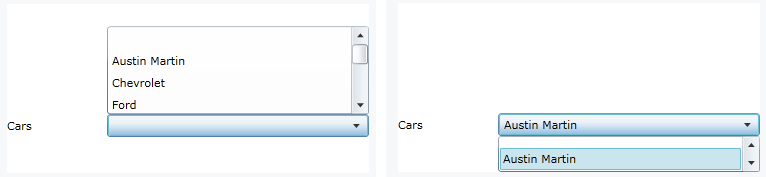
There are several annoying issues with Silverlight combo boxes. Firstly, have you ever tried to use a combo box in a really height restricted Silverlight page? It's just not at all viable and is something I have hit a few times in MS Dynamics CRM. If you need to develop a small web resource for a form that will contain a combo box you'll find it won't work, because your "frame" or area of use is restricted to the size of the Silverlight control, a bit like flash I guess. So even if your page is huge this is the sort of behaviour you'll notice happening on a combo box similar to the "Cars" combo box on my form:


The next problem with combo boxes that is quite annoying is if you add a blank row to a combo box it doesn't display it with the correct height:


See how we just have a little slither of a line above "Ford"? Well that's the blank row. This is incredibly annoying, but thankfully there's a quick but slightly dirty way to get around this, instead of using an empty string add a space to the string and suddenly it display it correctly.

Another nuisance of combo boxes is the direction the item list renders. Because of the first problem with Silverlight not being able to use the space outside of the control's frame it needs to be clever in which direction, up or down, the item list is rendered. This behaviour works fine first time around, as in the item list will render upwards if there is more room in that direction. But after that first time you've used the combo box it all goes a bit pear shaped:


(Yes, I notice "Aston" has a fantastic spelling fail... but I really can't be bothered to update the screen shot!)

There are a few ways to fix this, but the 2 best solutions, in my opinion, are

  1. Instead of binding to custom objects create ComboBoxItems and bind your combo box to a collection of those instead. (The Silverlight bug only rears its head when bound to custom objects)
  2. Create your own combo box template with the correct behaviour (can't believe I just wrote that!)
There are more combo box nuisances but these for me are the worst. Apart from the first one, which is more of a limitation, those second 2 are bugs that should never have made it to the public community.

Silverlight, JSON and dynamic types

The next thing I hate about Silverlight is the choice of deprecated libraries. I understand that they had to reduce the framework to make it somewhat viable for browser use, but why deprecate a library that's so closely linked to browsers and javascript? In short, if you want to parse JSON into a dynamic type in Silverlight you have to write your own parser. For more information see my blog post on the matter: silverlight-json-and-dynamic-types.

Assembly Library Caching

I don't have an issue with this actual concept, more of how it was implemented. It's quite common that you'll share XAPs between Silverlight pages and controls, such as images for example. So to reduce XAP sizes there is no real point including these in every single XAP file. If we split them up we can make use of caching and speed up our overall download times. The issue here is how this works in conjunction with MS Dynamics CRM (I haven't chosen which framework I will blame yet...). When you enable this in the project properties it splits up the relevant files into ZIP files (not XAP files). This is a royal pain in the buttocks, because you cannot upload ZIP files to MS Dynamics CRM. I have never bothered getting around this, but I'm guessing you could unzip the main XAP file, open up the AppManifest file, change the references to XAP instead of ZIP, and repack the XAP file again. Also you'd need to ensure you rename your other resources to XAP instead of ZIP. Unfortunately you would have to do this after every build, so you might have to write a post build script rather than performing it as a manual task. I haven't tested this yet either, but I'm fairly sure it would work fine once put in place.

Exposing browser error messages

Ever get that infamous error "The remote server returned an error: NotFound"? This is basically Silverlight telling you "something screwed up, but I have no idea what it was". To get your hands on the error messages you need to perform some registering on application start up:

WebRequest.RegisterPrefix("http://", System.Net.Browser.WebRequestCreator.ClientHttp)

This will get you better error messages, but has a massive drawback. If you're making a lot of simultaneous asynchronous calls your browser will now frequently crash. I'm not sure what it's doing behind the scenes here, but neither Silverlight or your browser seem to like it. 99% of the time I find myself removing that line and accepting rubbish error messages.

I could go on...

... but I won't. I'm sure not the first person who's come up with a list like this and I'm guessing I won't be the last.

Conclusion

So, my conclusion out of all of this is let's all admit that Silverlight was a nicety at the time, and we all enjoyed it to begin with. But in reality, HTML wins yet again, so can we please just let it die with dignity. Yes, it's easier to throw together a UI in Silverlight, but once you start binding that baby together, setting up all of those models and viewmodels and have gone through about 4 iterations of async callback hell and rewriting missing feature/property helpers, you'd have written 80% / 90% of the exact same thing in HTML5 and JQuery. Also, what with Silverlight not seeing any more upgrades after 5 I envisage a framework that will retain these bugs for some time yet. So for me it's time to drop the Silverlight baton (yet again!) and push HTML5 where ever I go.


Wednesday, 7 March 2012

If broken it isn't, fix it you shouldn't...

From speaking to some old friends of mine I heard about a cataclysmic implosion of a project I used to work on. This was a project that initially started as an extremely badly coded asp.net application (with horrors like functions with 1000+ lines of code). A project that we spent over a year on trying to upgrade to use much better patterns and practices and add tonnes of test coverage on while changing/adding features to the application. It was by no means perfect when we brought it over the finishing line, but it was a very solid and decent bit of code. The damn thing even won an award!

Anyway, it led me on to writing this blog post. And my tip of the day is:

"If broken it isn't, fix it you shouldn't..."

The basic concept I put forward is if something isn't broken then why change it? If you're changing something just because it's not agile enough, or you don't like the code, then you're not really following agile principles, or at least not following one of my favourites: Take the first bullet. Some people call it "fool me once, shame on you, fool me twice, shame on me". Effectively, if a requirement or story "fools" us into not making that abstraction, or into writing code that doesn't protect us from that bug, then that's the first bullet. When we get hit by that bullet it's time to abstract away or protect that code so that we don't get hit again.

Here's a really basic example: Let's say I ask you to write some code to sort a list of contacts by their name. You might write me a sorter class that takes in the list of contacts and returns a list sorted by their name. You might even go as far as passing in a parameter so that you can sort it by any field you want.

Then comes a second requirement - I want to sort it by email address as well as name, because I have 20 joe bloggs. Ok, so we didn't account for the ability to sort by multiple fields. One solution to this problem is add a parameter to allow you to add a second field to sort by. But what if we get 3 fields? Or what if the new field didn't have the same way of sorting as name? A better solution would be to introduce Comparer objects or something of that manner. That way you let the invoker tell you how to compare the objects and that way you've taken the first bullet. What we have in effect done is followed up by closing off a possibility of further sorting issues. (For more information on this look up OCP, or Open/Closed principle).

This is exactly what didn't happen in this "cataclysmic" project. Things were deemed "not agile enough" so changes were being made to modules and pages and classes that weren't taking any "bullets". Next thing you know things stopped working, because the whole project architecture started to change and remould over time. This is probably very much expected. So this (every so slightly) changed the situation into "broken it is (now), so fix it you bloody well should!". Their decision? Rewrite the whole project. My jaw left a dent on the floor when I heard that bit, no word of a lie... Such madness!

Finally, if you're astute you may have recognised that my blog entry title was very much inspired by an excellent blog by Tess Ferrandez! (If broken it is, fix it you should)